
Thread Border Router: External IP to Thread Network Bridge
Thread Border Router architecture explained: IPv6 bridging, commissioning, hardware choices, and redundancy for reliable mesh-to-IP gateways.
Contents & prerequisites
What is a Thread Border Router?
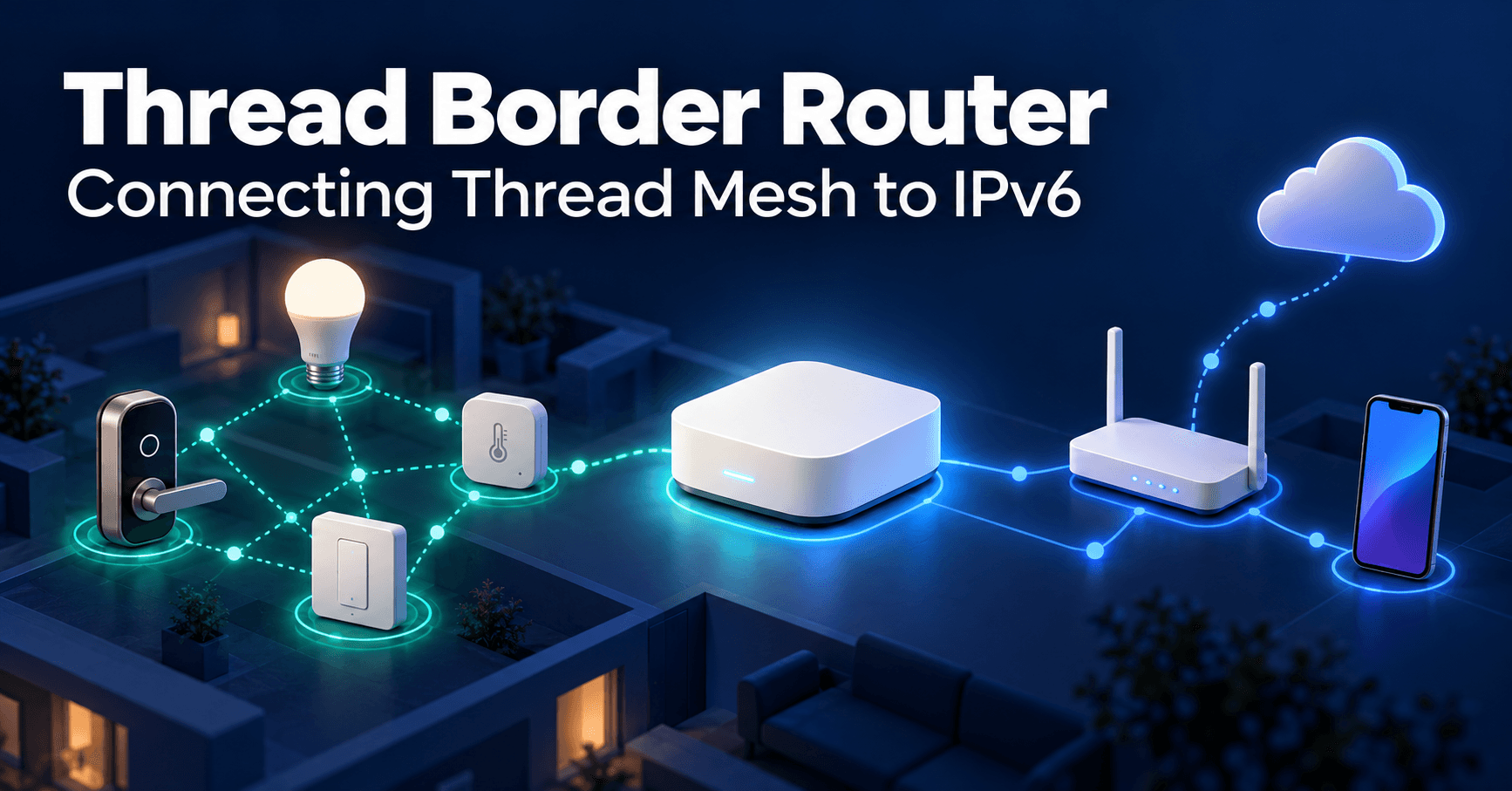
A Thread Border Router (BR) is the device that sits between a Thread mesh network — a low-power 802.15.4 wireless mesh built for sensors, locks, and switches — and the IP network that everything else on the planet uses to communicate. Without a border router, a Thread network is an island: nodes can talk to each other over 6LoWPAN, but nothing outside the mesh can reach them, and they can't reach the internet, a local hub, or a phone app on Wi-Fi.
Role in Thread mesh topology
Thread networks are self-healing mesh topologies composed of Router-eligible nodes and End Devices (battery-powered leaves that sleep most of the time). Within that mesh, one or more nodes also carry a second radio or network interface — typically Ethernet or Wi-Fi — and run the border router software stack. That dual-homed node becomes the only path in and out of the mesh for IP traffic. Every other Thread node continues to behave exactly as it would in an isolated mesh; the border router doesn't change Thread's routing protocol, it extends it.
IP bridge vs. relay node distinction
It's worth being precise about terminology because the two roles are easy to conflate. A Thread Router (capital R, a mesh role) forwards 802.15.4 frames between other Thread nodes to extend mesh coverage — it's a relay, operating entirely inside the 6LoWPAN domain. A Border Router does something categorically different: it terminates the 6LoWPAN domain and re-encapsulates packets for an external IPv6 network (or vice versa). A relay node has no idea what Ethernet or Wi-Fi even is. A border router straddles both worlds, and in Thread's addressing model it's also the entity responsible for advertising on-mesh prefixes outward and external routes inward. This distinction matters when you're debugging: a dead relay node just triggers mesh re-routing around it; a dead border router can sever the entire network's external connectivity even though the mesh itself is still healthy internally.
Single vs. multi-border router topologies
Thread was explicitly designed to tolerate multiple border routers on the same mesh, unlike many legacy gateway-centric protocols where the hub is a single point of failure. In a multi-BR deployment, each border router advertises its available external connectivity and prefixes via Thread's internal routing (using OMR — Off-Mesh Routable — prefixes), and the mesh picks the best-performing path dynamically. This redundancy model is central to why Thread is pitched as more resilient than, say, a single Zigbee hub architecture, and it's a direct consequence of Thread's position in the broader IoT architecture layers stack — the border router lives squarely at the network layer boundary, translating between the constrained perception-layer mesh and the application-layer services above it.
External IP Connectivity & Routing
IPv6 address translation and routing
Thread is IPv6-native end to end — there is no IPv4-style NAT inside the mesh. Each Thread node gets a Mesh-Local address (routable only within the mesh) and, when a border router is present, a Global or Off-Mesh Routable (OMR) address derived from a prefix the border router advertises. The border router's job is to run standard IPv6 routing between this OMR prefix and whatever upstream network it's attached to, plus perform 6LoWPAN header compression/decompression (defined in RFC 6282) so that verbose IPv6 headers survive the trip across a radio link with an MTU as low as 128 bytes.
A simplified packet path for a sensor reporting to a cloud endpoint looks like this:
[Sensor, Thread mesh]
  6LoWPAN-compressed IPv6 packet
        |
        v
[Border Router]
  - decompress 6LoWPAN -> full IPv6
  - apply OMR prefix routing
  - forward over Ethernet/Wi-Fi uplink
        |
        v
[Home router / ISP] --IPv6--> [Cloud service]
Prefix management and delegation
Border routers run a process (in OpenThread, this is the BorderRouting / routing manager component) that performs IPv6 prefix discovery on the infrastructure link using standard Router Solicitation/Advertisement, then publishes a corresponding OMR prefix into the Thread Network Data. If multiple border routers are present, Thread's leader arbitrates which prefixes are authoritative and deduplicates overlapping advertisements. Get this wrong — for instance, two border routers independently advertising conflicting prefixes because one has stale state after a reboot — and you get asymmetric routing or dropped external connectivity for a subset of mesh nodes, which is a genuinely common field failure mode worth checking first when "some devices are reachable and some aren't."
NAT-free architecture benefits
Because Thread avoids NAT entirely, every device can in principle have a globally unique, routable IPv6 address, which simplifies peer-to-peer application protocols (CoAP, Matter's device-to-device messaging) that otherwise break under NAT traversal hacks. The trade-off is that the border router — and the firewall/ACL policy on whatever network it bridges to — becomes the actual security boundary, not a NAT table that accidentally provided obscurity. Border router firmware typically restricts inbound initiation from the external network and relies on IPv6 Neighbor Discovery plus Thread's own commissioning credentials, not address hiding, for protection.
Thread Network Integration
WPAN-to-IP gateway function
The border router advertises itself on the local IP network (usually via mDNS) so that commissioning apps and cloud agents can find the mesh without manual configuration — this is the practical glue that lets a phone app discover "a Thread network is present on this Wi-Fi segment" before it ever talks 802.15.4.
Border Agent role and commissioning
Every Thread border router runs a Border Agent service, which listens on the IP side (typically over DTLS) for commissioning requests and relays them into the mesh's commissioning protocol. When a user scans a QR code on a new bulb or lock, the commissioning app connects to the Border Agent, authenticates using the device's installation code, and the Border Agent forwards the exchange to the Commissioner role running either on the border router itself or on another authorized node. This is the mechanism that answers "how do devices actually join through the border router": the BR isn't deciding who joins, it's the transport that carries the joining handshake between an external app and the in-mesh Commissioner/Leader.
Thread Leader election and border router priority
Thread elects a single Leader node responsible for network-wide data like prefix assignment and router ID allocation. Any Router-eligible node, including a border router, can become Leader, and border routers typically advertise a priority value so the network prefers routing external traffic through whichever BR has the best uplink (Ethernet over Wi-Fi, for instance). Leader re-election after a BR failure happens automatically within Thread's normal timeout windows — look up the specific LEADER_TIMEOUT value in the Thread specification for your stack version rather than assuming a fixed number.
Hardware & Software Requirements
Dual interface requirements (Thread radio + IP uplink)
At minimum, a border router needs an 802.15.4 radio (2.4 GHz, same PHY as Zigbee but a different stack) and a second interface — Ethernet, Wi-Fi, or occasionally Thread-over-infrastructure. Many SoCs combine both on one die with the radio handling 802.15.4 and a companion processor or integrated Wi-Fi handling the uplink; other designs split the roles across two chips connected by SPI or UART, with a Linux or RTOS host running the IP stack and border router daemon while a small MCU handles only the radio layer (the RCP, or Radio Co-Processor, pattern).
Common SoC platforms and reference designs
Reference implementations exist from Nordic, Silicon Labs, Espressif, and others; most follow the same RCP + host split, with the host running OpenThread's border router daemon (otbr-agent) atop Linux. Check each vendor's current reference design documentation for exact part numbers and radio performance figures rather than relying on older marketing collateral, since silicon revisions change frequently.
Open Thread stack implementation
OpenThread, the open-source Thread stack originally released by Google/Nest, is the de facto reference implementation most commercial border routers build on, including the border router daemon, Border Agent, and routing manager components described above. Its modularity is also why Thread border routers show up inside general-purpose smart-home hubs: the stack can run as one service alongside Matter, Zigbee, or other protocol daemons on the same Linux host, which is directly relevant to the fragmentation problem described in IoT interoperability and the standards gap — a single physical hub increasingly has to speak several mesh and IP protocols concurrently rather than committing to one.
Deployment Patterns & Use Cases
Home automation and smart building scenarios
In residential deployments, the border router is often embedded inside a smart speaker, Wi-Fi mesh node, or dedicated hub (Matter-certified hubs are the common path in 2024-era deployments). Each such device straddles the constrained/gateway boundary discussed in IoT device classification: the Thread end devices are constrained nodes, the border router is the gateway-class device, and whatever cloud service aggregates data is the cloud tier.
Multi-subnet Thread networks
Larger buildings sometimes need more than one Thread mesh because 802.15.4 mesh diameter and channel capacity both have practical limits — check your vendor's stack documentation for the maximum recommended router count per mesh before assuming a single mesh scales to a whole building. Multiple meshes, each with its own border router(s), can share a backbone IPv6 network, with Thread's "Backbone Router" feature handling multicast and address resolution across the boundary.
Failover and redundancy strategies
For any deployment beyond a single room, deploy at least two border routers with independent uplinks (e.g., one on Ethernet, one on Wi-Fi) so an uplink failure on one doesn't isolate the mesh. Thread's dynamic prefix preference handles failover automatically, but it's worth validating in your own lab that failover time meets your application's tolerance — some control-plane operations (like a new device trying to join during the failover window) may stall for several seconds.
Configuration & Commissioning
Network key and credential management
Thread networks are protected by a Network Key (used for mesh-layer encryption) and a separate Commissioning credential (PSKc, derived from a human-readable passphrase) used only during the joining handshake. Border router vendors generally generate and store these via their provisioning app rather than exposing raw hex keys to installers, but for lab and field-debug work it's worth knowing both exist and serve different purposes: losing the Network Key means re-provisioning the whole mesh, while PSKc only affects new joins.
Joining Thread devices through the border router
A typical commissioning sequence: the installer app scans a device's QR code to get its EUI-64 and joining passphrase, connects to the Border Agent over the local IP network via DTLS, the Border Agent relays a joiner handshake into the mesh, the in-mesh Commissioner authenticates the device and hands it the Network Key, and the device then attaches as a Thread End Device or Router. This entire sequence typically completes in a few seconds under good radio conditions; repeated failures usually point to RF range issues or a stale Border Agent session rather than credential problems.
DNS-SD and mDNS discovery
Thread devices and services advertise themselves using DNS-SD over Thread's native multicast, and the border router bridges this to standard mDNS on the IP side, which is how a phone on Wi-Fi can discover _matter._tcp or _meshcop._udp services advertised by devices several hops deep in the mesh without any cloud round-trip.
Performance & Reliability Considerations
Latency and jitter through the bridge
Traffic crossing the border router incurs the cost of 6LoWPAN decompression/compression, routing lookups, and queuing on both interfaces. In practice this adds low-single-digit milliseconds under light load, but jitter can grow substantially under mesh congestion or when a packet has to traverse several hops before reaching the border router — the physical radio hop count matters more than the bridge logic itself for end-to-end latency.
Bandwidth constraints of Thread radio
802.15.4 at 2.4 GHz offers a raw PHY rate on the order of 250 kbps, shared across every node in the mesh and consumed further by routing overhead and retransmissions. The border router's IP uplink (Ethernet or Wi-Fi) is never the bottleneck; the constrained radio hop is. This asymmetry is the same trade-off covered generally in IoT connectivity trade-offs around range, bandwidth, power, and cost — Thread optimizes for range and power at the deliberate expense of throughput, so border router deployments should never be sized expecting video- or firmware-image-scale traffic across the mesh without chunking and backoff logic.
Packet loss recovery mechanisms
Thread relies on 802.15.4 MAC-layer acknowledgments and retries, plus mesh-layer route repair, to recover from the packet loss typical of RF environments. The border router itself doesn't add retry logic beyond standard IP behavior (TCP retransmission, or application-layer retries for CoAP/UDP traffic); it simply forwards whatever survives the mesh hop. When diagnosing application-level timeouts, check mesh-side link quality statistics (RSSI, LQI, frame retry counts, available via most OpenThread CLI tools) before assuming the border router or upstream network is at fault.
Learning
Sign in to track your progress.
Evidence
Public projects engineers linked to Thread Border Router: External IP to Thread Network Bridge.
No engineer has linked a project to this topic yet. Built something that proves it? Add the project and tag it with iot-connectivity-thread-border-router-external-ip-to-thread-network — it then shows here and on your public profile.